
One AI Endpoint for Everything – LiteLLM with llama.cpp and Ollama
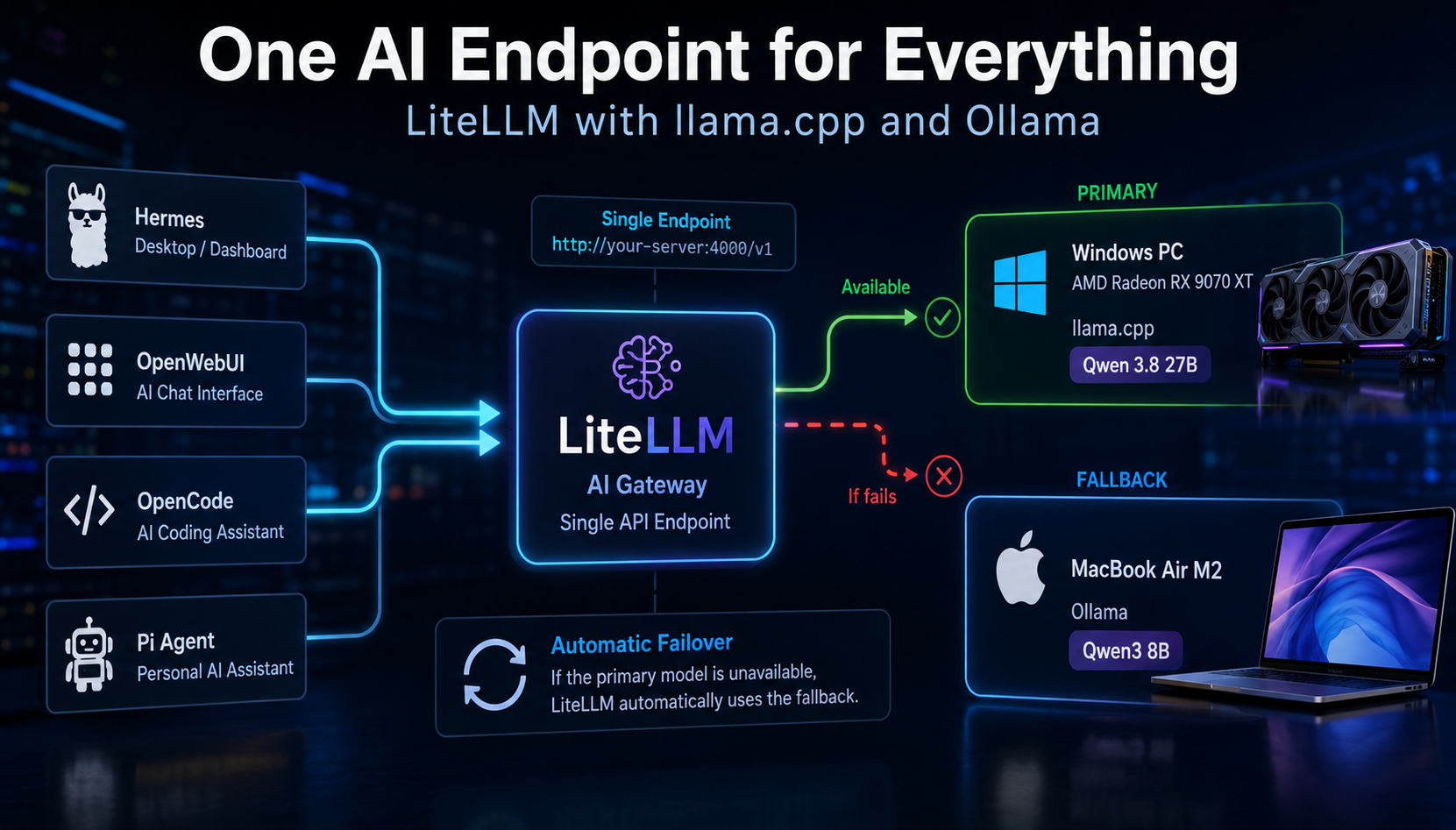
Ever wondered how you can expose a single AI endpoint for multiple
local AI hosts? I did --- and LiteLLM turned out to be a surprisingly
simple solution.
I have a small server running TrueNAS 24/7. It hosts quite a few
services, mostly containers and additional VMs. Besides that, I use a
Windows PC with an AMD Radeon RX 9070 XT and a MacBook Air M2.
I've been experimenting a lot with local AI recently, and my latest
tests showed just how much progress has been made when it comes to
running capable models locally at acceptable speeds.
So I figured it was time to centralize some of my AI tooling as well.
For example, I run Hermes inside an isolated VM on my 24/7 server and
also use tools such as OpenWebUI, OpenCode and Pi Agent.
But one problem remained.
My Windows PC isn't powered on 24/7. My MacBook isn't always available
either. And whenever I switched between the two machines, I had to
change the API endpoint in whatever application I was using.
That got annoying quickly.
Wouldn't it be useful to have one central AI API endpoint that knows
about all available inference servers in my LAN and automatically uses
another one if the preferred server is offline?
Say hello to LiteLLM.
My setup
There are three systems involved:
| IP address | System | Role |
|---|---|---|
192.168.2.69 |
Windows / AMD Radeon RX 9070 XT 16 GB | local-big |
192.168.2.49 |
MacBook Air M2 | local-small |
192.168.2.78 |
LiteLLM server | Central OpenAI-compatible endpoint |
The inference backends look like this:
192.168.2.69
└── Windows / WSL2
    └── AMD Radeon RX 9070 XT 16 GB
        └── llama.cpp
            └── Qwen 3.8 27B
                └── local-big

192.168.2.49
└── MacBook Air M2
    └── Ollama
        └── Qwen3 8B
            └── local-small

192.168.2.78
└── LiteLLM
    └── Central OpenAI-compatible API endpoint
On the client side I'm using several different AI tools, including:
- Hermes
- OpenWebUI
- OpenCode
- Pi Agent
Instead of configuring individual inference servers in every
application, I wanted this:
                       ┌─► 192.168.2.69
                       │   local-big
                       │   RX 9070 XT / llama.cpp / Qwen 27B
                       │
Applications ─► LiteLLM
               192.168.2.78
                       │
                       └─► 192.168.2.49
                           local-small
                           MacBook Air M2 / Ollama / Qwen3 8B
And, importantly:
local-big available?
       │
      YES ──► use RX 9070 XT / Qwen 27B
       │
       NO
       ▼
fallback to local-small
       │
       ▼
MacBook Air M2 / Qwen3 8B
The applications themselves don't need to know where either model
actually runs. They only know about LiteLLM.
I also looked at Pangolin's AI Gateway functionality, since I already
use Pangolin in my environment, but LiteLLM's model routing and ordered
fallback functionality was exactly what I was looking for here.
Deploying LiteLLM
Deployment was very simple.
LiteLLM offers several installation options in its Docker quick start. I
chose Docker Compose:
mkdir litellm
cd litellm

curl -sSLO https://docs.litellm.ai/docker-compose.yml

# IMPORTANT:
# Change LITELLM_SALT_KEY and LITELLM_MASTER_KEY!

vim docker-compose.yml

docker compose up -d
After successful deployment, the Web UI is available on port 4000:
http://192.168.2.78:4000
Security note: Do not expose the LiteLLM proxy to untrusted
networks with a weak example master key. Use a strong secret and
consider separate virtual keys for clients instead of distributing the
master key.
In the LiteLLM UI, go to:
Models + Endpoints → Add Model
Check connectivity first
Before adding anything, I verified that the LiteLLM machine could
actually reach both inference servers.
First, llama.cpp on my Windows/WSL machine:
curl http://192.168.2.69:8080/v1/models
The response contains my 27B GGUF model:
{
  "id": "/home/olive/models/qwen38/Qwen3.8-27B-UD-Q3_K_XL.gguf",
  "owned_by": "llamacpp"
}
Then Ollama on the MacBook:
curl http://192.168.2.49:11434/v1/models
Response:
{
  "object": "list",
  "data": [
    {
      "id": "qwen3:8b",
      "object": "model",
      "owned_by": "library"
    }
  ]
}
Both servers are reachable. Perfect.
Adding llama.cpp
For the first backend I added my llama.cpp server.
The actual inference server is reachable at:
http://192.168.2.69:8080
This is the large local model running on the RX 9070 XT.
The relevant values in my working LiteLLM configuration are:
Provider: OpenAI-Compatible Endpoint
API Base: http://192.168.2.69:8080

LiteLLM Model Name: local-big

Model Mapping:
Public Model Name: Qwen3.8-27B-UD-Q3_K_XL.gguf
LiteLLM Model Name: local-big
After entering the endpoint and model information, LiteLLM provides a
convenient Test Connection button. If that succeeds, add the model.
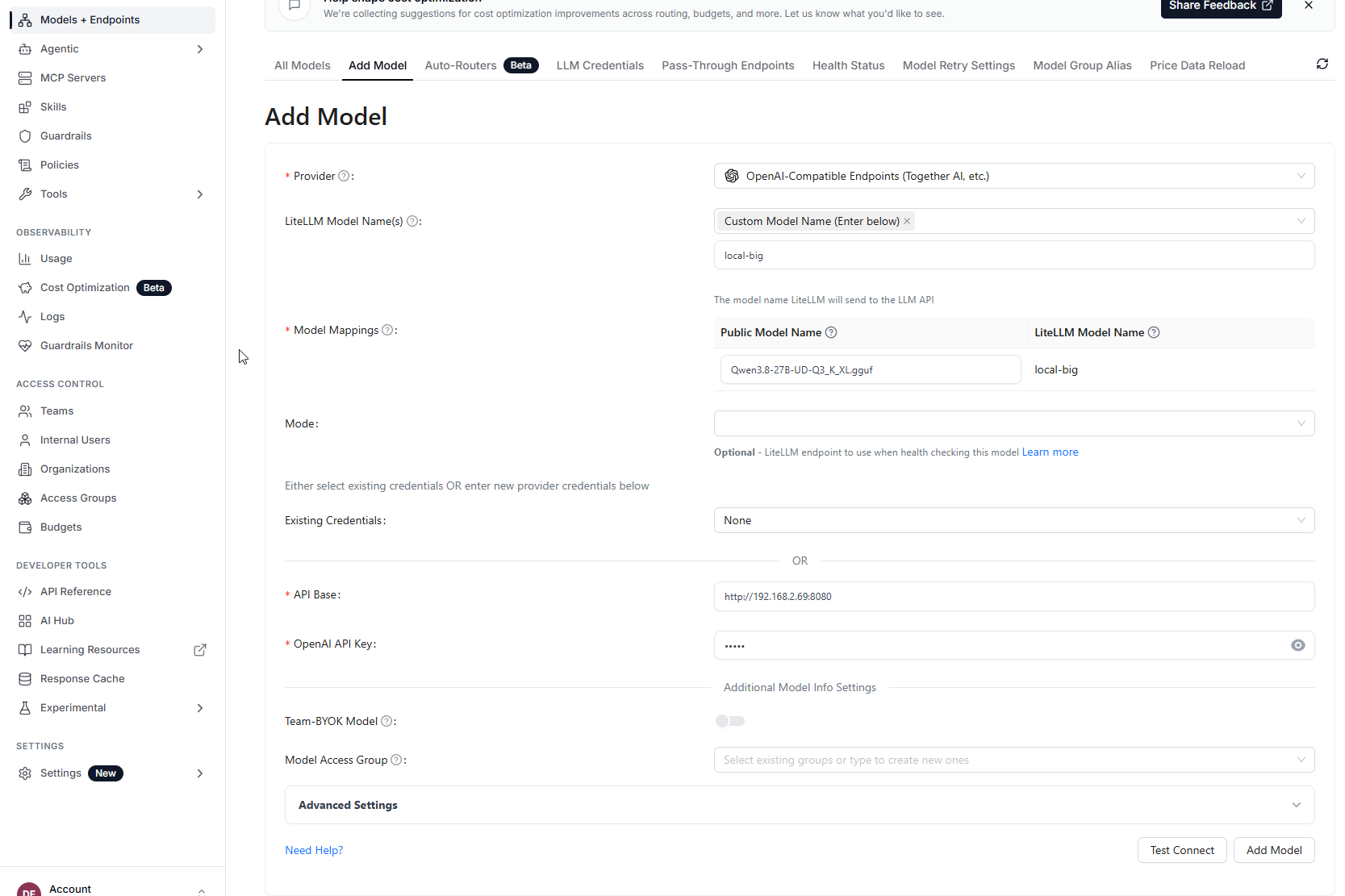
Configuring the RX 9070 XT / llama.cpp backend as local-big in
LiteLLM.
Using the logical name local-big means my clients no longer need to
depend on the long GGUF filename.
Adding Ollama
Next I added the MacBook.
Ollama is reachable at:
http://192.168.2.49:11434
The actual model name is:
qwen3:8b
One important detail:
The backend model name must exactly match the model name reported by
Ollama.
Correct:
qwen3:8b
Not:
qwen3-8b
That tiny difference cost me a few minutes. :)
For the final configuration I use Ollama Chat as the provider.
The relevant values are:
Provider: Ollama Chat
LiteLLM Model Name: qwen3:8b

Model Mapping:
Public Model Name: local-small
LiteLLM Model Name: qwen3:8b

API Base: http://192.168.2.49:11434
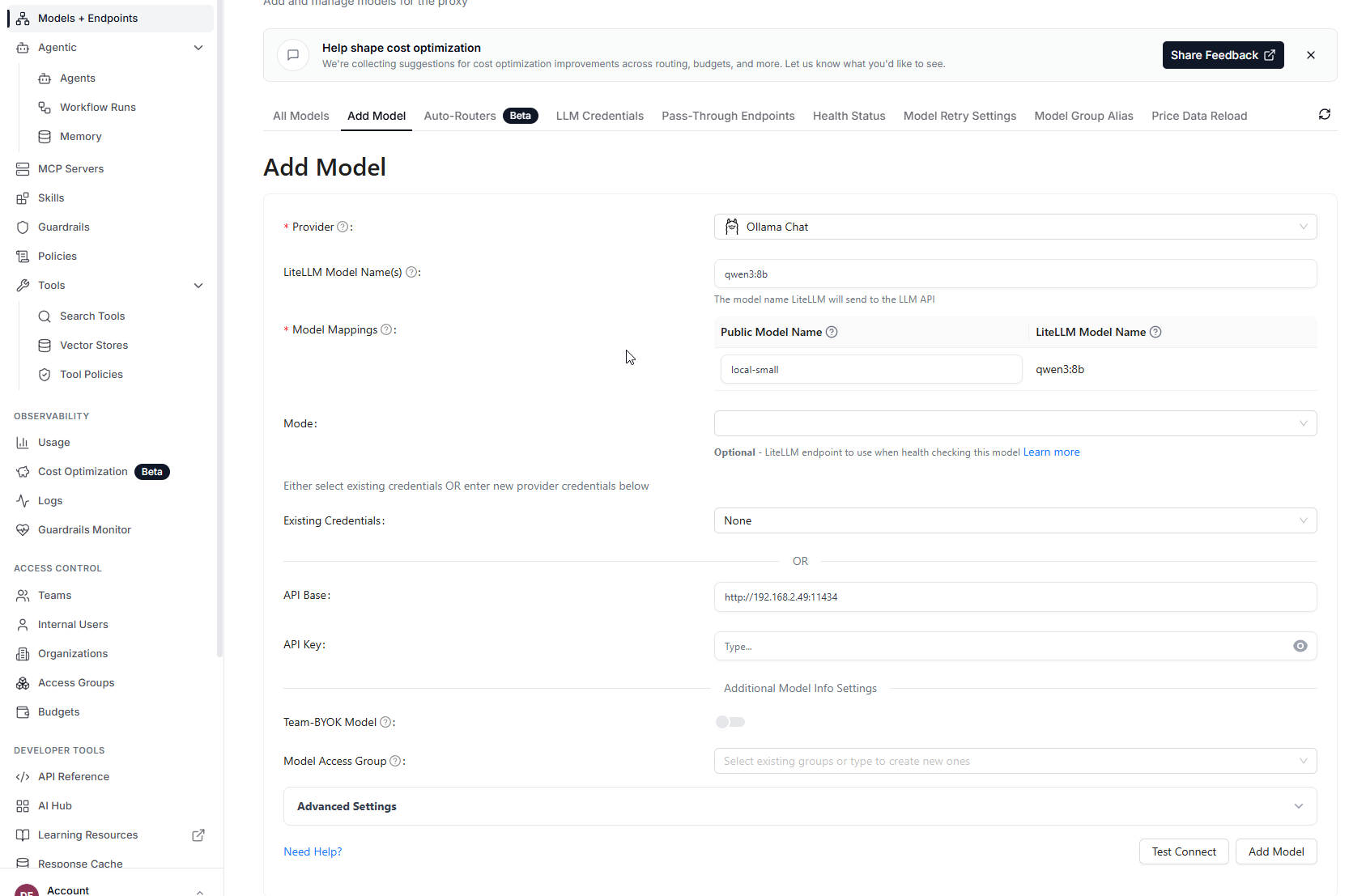
Configuring Qwen3 8B on the MacBook Air as the local-small Ollama
Chat backend.
Why I switched to Ollama Chat
There was another important lesson while connecting OpenCode.
Normal completions worked with LiteLLM's regular Ollama provider path,
and even non-streaming tool calls looked fine. But streaming tool calls
did not behave correctly for my agent workload.
With the regular path, the streamed function call arrived as ordinary
content instead of a structured tool call.
Switching the backend to Ollama Chat fixed the important part.
Internally, LiteLLM handles this through its ollama_chat provider
path:
ollama_chat/qwen3:8b
The streamed response then contained a structured tool_calls delta.
For applications such as OpenCode that rely heavily on streaming and
tools, this distinction matters.
Logical model names
The client-facing names I care about are now:
local-big
local-small
Conceptually:
local-big
└── 192.168.2.69
    └── llama.cpp
        └── Qwen3.8-27B-UD-Q3_K_XL.gguf

local-small
└── 192.168.2.49
    └── Ollama Chat
        └── qwen3:8b
This is much cleaner than teaching every client the actual backend model
names.
If I replace one of the models later, I can change the LiteLLM
configuration while keeping the logical names used by clients.
Automatic model fallback
What I really wanted was automatic failover.
The 27B model running on my RX 9070 XT should be preferred whenever the
Windows PC is online.
If it isn't available, LiteLLM should automatically use the 8B model
running on my MacBook.
In the LiteLLM UI, go to:
Settings → Router Settings → Fallbacks
I configured:
Primary
local-big
    │
    │ failure
    ▼
Fallback
local-small
In other words:
local-big → local-small
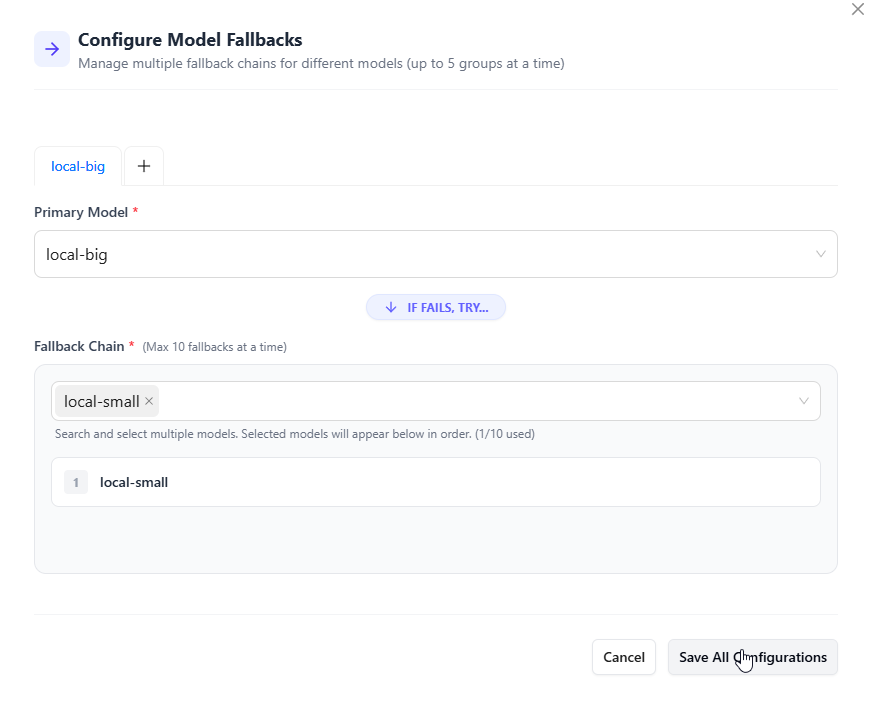
LiteLLM fallback configuration: if local-big is unavailable, requests
are routed to local-small.
The fallback rule needs to use the same model group name that the client
requests.
I initially had a mismatch between the fallback rule and the model name
in the API request. LiteLLM correctly responded with:
No fallback model group found for original model_group=...
Using local-big and local-small consistently fixed that and made the
setup cleaner.
Testing the central endpoint
Clients now need only one API endpoint:
http://192.168.2.78:4000/v1
For shell testing I use:
export KEY='<your-litellm-key>'
Then:
curl http://192.168.2.78:4000/v1/models \
  -H "Authorization: Bearer $KEY"
Testing local-big
With the Windows machine and llama.cpp running:
curl http://192.168.2.78:4000/v1/chat/completions \
  -H "Authorization: Bearer $KEY" \
  -H "Content-Type: application/json" \
  -d '{
    "model": "local-big",
    "messages": [
      {
        "role": "user",
        "content": "Reply only with: BIG WORKS"
      }
    ]
  }'
The request goes through LiteLLM to the Qwen 27B backend on the RX 9070
XT.
Testing the fallback
Now for the important part.
I stopped llama.cpp on the Windows machine and sent another request to
exactly the same LiteLLM endpoint:
curl http://192.168.2.78:4000/v1/chat/completions \
  -H "Authorization: Bearer $KEY" \
  -H "Content-Type: application/json" \
  -d '{
    "model": "local-big",
    "messages": [
      {
        "role": "user",
        "content": "Reply only with: FALLBACK WORKS"
      }
    ]
  }'
This time the response reported:
{
  "model": "ollama_chat/qwen3:8b",
  "choices": [
    {
      "message": {
        "content": "FALLBACK WORKS",
        "role": "assistant"
      }
    }
  ]
}
Hooray!
The client still requested:
local-big
but LiteLLM transparently sent the request to:
local-small → MacBook Air M2 → Ollama Chat → Qwen3 8B
No endpoint change. No client reconfiguration.
That's exactly what I wanted.
Testing with OpenCode
Simple chat completions are one thing. Agentic coding tools are a better
test because they use function/tool calling and usually stream
responses.
My OpenCode project configuration looks like this:
{
  "$schema": "https://opencode.ai/config.json",
  "provider": {
    "litellm": {
      "npm": "@ai-sdk/openai-compatible",
      "name": "LiteLLM",
      "options": {
        "baseURL": "http://192.168.2.78:4000/v1"
      },
      "models": {
        "local-big": {
          "name": "Local AI via LiteLLM",
          "limit": {
            "context": 40960,
            "output": 8192
          }
        }
      }
    }
  },
  "model": "litellm/local-big"
}
The LiteLLM API key is stored through OpenCode's authentication
mechanism rather than directly in the project configuration.
This gives me:
OpenCode
   │
   │ model = local-big
   ▼
LiteLLM
   │
   ├──► RX 9070 XT / Qwen 27B
   │
   └──► fallback: MacBook Air M2 / Qwen3 8B
With the big backend offline, I tested a streamed tool call through
LiteLLM.
The important part of the response looked like this:
{
  "delta": {
    "tool_calls": [
      {
        "function": {
          "name": "question",
          "arguments": "{\"question\":\"What operating system do you use?\"}"
        }
      }
    ]
  }
}
That was the missing piece for OpenCode.
Once I used the Ollama Chat backend and the logical model/fallback
configuration, OpenCode could continue working through the fallback path
as well.
Watching the Mac take over with asitop
Once failover works, there is another question:
Is the Mac GPU actually doing the work?
On an NVIDIA system I would normally reach for nvidia-smi or nvtop.
Apple Silicon works differently. CPU and GPU share unified memory, and
there is no direct nvidia-smi equivalent.
A very nice terminal tool for this is asitop.
Install it using pipx:
brew install pipx
pipx install asitop
Then:
sudo asitop
If sudo cannot find it, use the full path reported by pipx, for
example:
sudo ~/.local/bin/asitop
Time for the real-world test.
I stopped local-big completely and continued working in OpenCode
without changing its configuration. LiteLLM automatically routed the
request to local-small on my MacBook Air.
Running asitop next to OpenCode makes the failover pretty obvious:
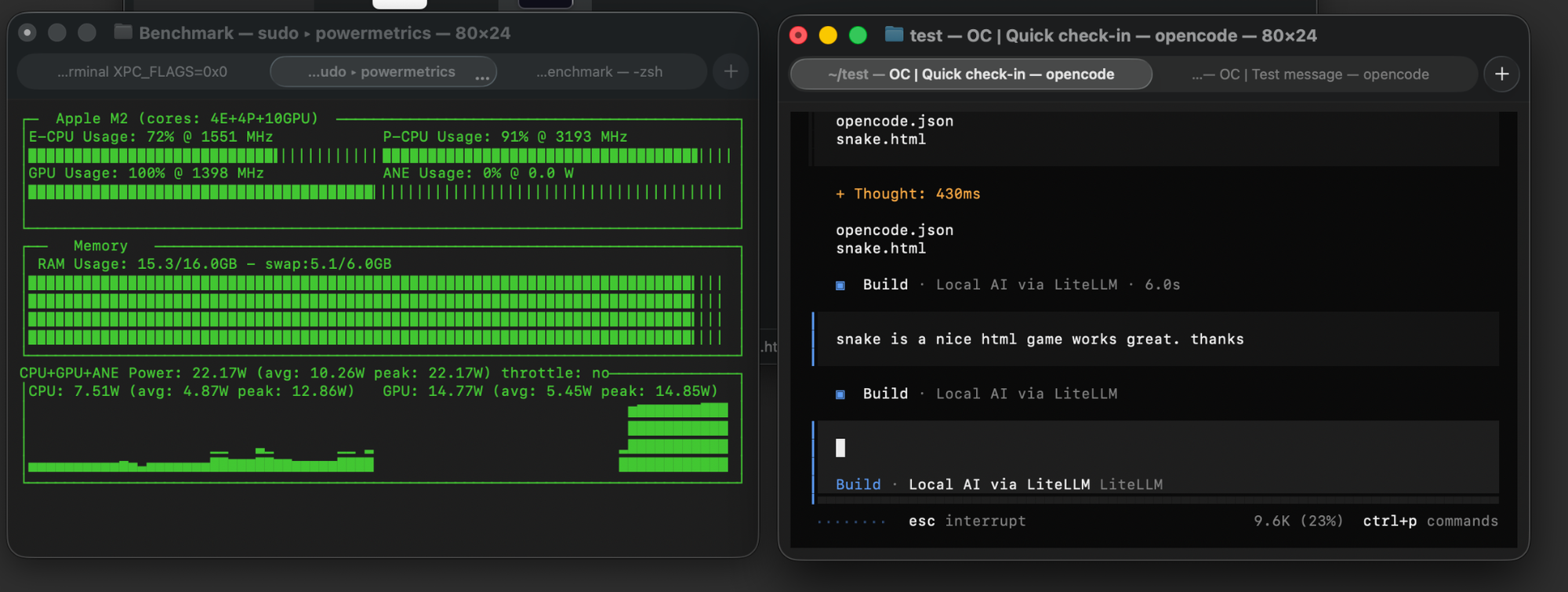
OpenCode running through LiteLLM while local-big is offline. asitop
shows the M2 GPU at 100% utilization as the local-small fallback
handles the request.
Ollama itself also provides a useful quick check:
ollama ps
For my running model this showed:
NAME        SIZE    PROCESSOR   CONTEXT
qwen3:8b    11 GB   100% GPU    40960
So the model is fully GPU-backed and running with a 40,960-token
context.
macOS also has a built-in lower-level option:
sudo powermetrics --samplers gpu_power -i 1000
For everyday monitoring, though, I find asitop much easier to read.
What the final setup looks like
                         ┌──────────────────────────────┐
                         │  Windows PC                  │
                         │  192.168.2.69                │
                         │  RX 9070 XT                  │
                         │  llama.cpp / Qwen 27B        │
                         │  local-big                   │
                         └──────────────▲───────────────┘
                                        │ primary
                                        │
┌─────────────────┐          ┌──────────┴───────────┐
│ Hermes          │          │                      │
│ OpenWebUI       ├─────────►│       LiteLLM        │
│ OpenCode        │          │    192.168.2.78      │
│ Pi Agent        │          │                      │
└─────────────────┘          └──────────┬───────────┘
                                        │ fallback
                                        │
                         ┌──────────────▼───────────────┐
                         │  MacBook Air M2              │
                         │  192.168.2.49                │
                         │  Ollama / Qwen3 8B           │
                         │  local-small                 │
                         └──────────────────────────────┘
All clients use:
http://192.168.2.78:4000/v1
and request:
local-big
LiteLLM handles the rest.
One endpoint to rule them all
This turned out to be much easier than I expected --- although the
streaming/tool-call debugging added an interesting detour.
Instead of:
Hermes ──────► llama.cpp
OpenWebUI ───► Ollama
OpenCode ────► llama.cpp
Pi Agent ────► Ollama
I now have:
Hermes ──────┐
OpenWebUI ───┤
OpenCode ────┼──► LiteLLM ──► local-big
Pi Agent ────┘                  │
                                └── failure ─► local-small
My applications no longer need to care whether the Windows PC is
running, whether the MacBook is available, or where the actual model is
hosted.
They just talk to LiteLLM.
There are a few things I particularly like about this approach:
- One API endpoint for all local AI applications
- Logical model names hide the actual backend implementation
- Automatic fallback when the preferred inference server is
offline - OpenAI-compatible API, making integration with existing tools
easy - Agent/tool support works through the fallback path with the
right Ollama provider configuration - Easy monitoring with tools such as
asitop - The entire setup remains local
LiteLLM also makes it possible to add additional backends or cloud
providers later, so the chain could eventually become:
RX 9070 XT / Qwen 27B
          │
          ▼
MacBook Air M2 / Qwen3 8B
          │
          ▼
Cloud model
For now, though, I'm keeping it completely local.
One API endpoint. Multiple inference servers. Automatic fallback.
Done.
AI transparency note: AI tools were used during the creation of this
article to help with language editing, structure, and the featured
image. The setup, configuration, testing, and conclusions are based on
my own hands-on experience.