
Can a 16GB AMD GPU Run a Local AI Agent? ROCm + llama.cpp + Hermes in WSL2
Running a Local AI Agent on AMD: ROCm, WSL2, llama.cpp and Hermes Agent
Update: 64K Context + MTP at Almost 50 Tokens/s
This update was added on August 26, 2026. The original article continues below.
After updating llama.cpp to version 0.3.0-dev build 10640 and experimenting with the latest MTP support, I managed to push this setup quite a bit further.
The same Radeon RX 9070 XT with 16 GB of VRAM can now run:
- Qwen3.8-27B
- Q3_K_XL quantization
- 65,536 token context
- Multi-Token Prediction (MTP)
- full GPU offload
- ROCm under WSL2
- Hermes Agent
- up to ~49 tokens/s generation
The interesting part is that all of this still fits into 16 GB of VRAM.
The Working Configuration
This is the llama.cpp configuration I ended up with:
./llama-server \
  -m ~/models/qwen38/Qwen3.8-27B-UD-Q3_K_XL.gguf \
  -ngl 999 \
  -c 65536 \
  -fa on \
  --jinja \
  --reasoning on \
  --reasoning-effort low \
  --reasoning-budget 1024 \
  --no-reasoning-preserve \
  --reasoning-format auto \
  --spec-type draft-mtp \
  --spec-draft-n-max 2 \
  --cache-type-k q4_0 \
  --cache-type-v q4_0 \
  --batch-size 1024 \
  --ubatch-size 256 \
  --parallel 1 \
  --host 0.0.0.0 \
  --port 8080
There were three changes that made a particularly big difference:
--spec-draft-n-max 2
--batch-size 1024
--ubatch-size 256
Reducing the batch and micro-batch sizes freed enough VRAM to keep MTP enabled without pushing model layers back onto the CPU.
And that turned out to be extremely important.
Full GPU Offload Is Critical
During testing, I tried running the same 64K context with MTP using settings that required llama.cpp to offload some layers to the CPU.
It worked, but performance dropped to roughly:
~11 tokens/s
That completely defeats the purpose of MTP.
Without MTP, but with all model layers on the GPU, Qwen3.8-27B was already much faster.
The real breakthrough was getting 64K context + MTP + full GPU offload to fit at the same time.
The rule for this GPU seems to be:
Full GPU offload first. MTP second.
MTP Performance
With a small prompt, the final configuration produced:
prompt eval time = 1386.32 ms / 486 tokens
                 = 350.57 tokens/s

eval time        = 21297.84 ms / 1040 tokens
                 = 48.78 tokens/s
So generation is now just under 49 tokens/s.
Even more interesting is the MTP acceptance rate:
draft acceptance = 0.75301
625 accepted / 830 generated
mean len = 2.51

acc per pos = (0.836, 0.670)
That's a 75.3% overall draft acceptance rate.
The first speculative position was accepted about 83.6% of the time, while even the second position still achieved 67%.
For --spec-draft-n-max 2, that seems to be an excellent result.
What About a Real Hermes Agent Context?
Of course, ~49 tokens/s with a tiny prompt is a best-case benchmark.
Hermes Agent is much more demanding.
Its system prompt, tool definitions, conversation history and tool results can quickly consume tens of thousands of tokens.
I therefore tested the same setup with a Hermes request containing approximately 21,600 input tokens.
Prompt processing started at around 1,000 tokens/s and gradually dropped as the context grew:
4096 tokens  → 1022.58 tokens/s
8192 tokens  →  948.93 tokens/s
16384 tokens →  869.95 tokens/s
20480 tokens →  833.51 tokens/s
21634 tokens →  795.29 tokens/s
Processing the complete ~21.6K prompt took roughly 27 seconds.
Generation then looked like this:
126 tokens → 41.14 tokens/s
236 tokens → 38.65 tokens/s
353 tokens → 38.72 tokens/s
So with more than 21K tokens already in context, Qwen3.8-27B was still generating at roughly 39 tokens/s.
For me, this is actually the more interesting result.
Reasoning Needed Some Tuning Too
Another issue I ran into was reasoning.
Initially llama.cpp reported effectively unlimited reasoning:
budget=2147483647 tokens
That's not particularly useful for an agent that may make many model calls during a single task.
Hermes could spend thousands of tokens reasoning during every step, quickly filling the 64K context window.
The current llama.cpp builds provide a much better option:
--reasoning-effort low
--reasoning-budget 1024
--no-reasoning-preserve
The server now correctly reports:
activated, budget=1024 tokens
This keeps individual agent steps under control and prevents previous reasoning traces from unnecessarily consuming context.
I also stopped using my custom Claude-style Jinja template and switched back to the model's native template.
That worked perfectly with the current llama.cpp build and simplified the configuration considerably.
VRAM Usage
This configuration is definitely close to the limit.
Windows reports roughly:
~15.7 / 16 GB dedicated VRAM
llama.cpp itself also warns that it cannot maintain its preferred free-memory reserve.
Using:
-ngl 999
forces full GPU offload anyway.
In this configuration it works, but there isn't much headroom left.
A larger batch size, larger MTP draft, another application using VRAM or changes in llama.cpp memory allocation could easily push the setup over the edge.
Final Results
| Configuration | Result |
|---|---|
| GPU | Radeon RX 9070 XT 16 GB |
| Model | Qwen3.8-27B Q3_K_XL |
| Context | 65,536 tokens |
| GPU offload | Full |
| KV cache | Q4_0 |
| MTP | Enabled |
| MTP draft max | 2 |
| MTP acceptance | 75.3% |
| Short-context generation | 48.78 tok/s |
| ~21K-context generation | ~39 tok/s |
| ~21K prompt processing | ~795 tok/s |
| Reasoning budget | 1,024 tokens |
So, How Far Can 16 GB Really Go?
Quite a bit further than I expected.
The RX 9070 XT is now running a 27B dense model with 64K context, MTP and full GPU offload inside 16 GB of VRAM.
And this isn't just a synthetic benchmark.
With a realistic Hermes Agent context of more than 20K tokens, generation remains around 39 tokens/s.
With a small context, it approaches 50 tokens/s.
That's a huge improvement over my earlier configuration and makes the whole local-agent setup feel considerably more responsive.
The biggest lesson from all of this was surprisingly simple:
Don't sacrifice full GPU offload just to enable another optimization.
and
It's not a shame to use AI to improve local AI performance.
MTP is fantastic when it fits.
MTP combined with CPU-offloaded model layers is not.
On this particular 16 GB AMD GPU, carefully reducing the batch sizes and limiting MTP to two draft tokens turned out to be the sweet spot.
Running a local Large Language Model is becoming increasingly attractive, especially for AI agents that need privacy, low latency, and full control over their data.
The Setup
Running one on NVIDIA hardware is relatively straightforward these days.
AMD is a different story.
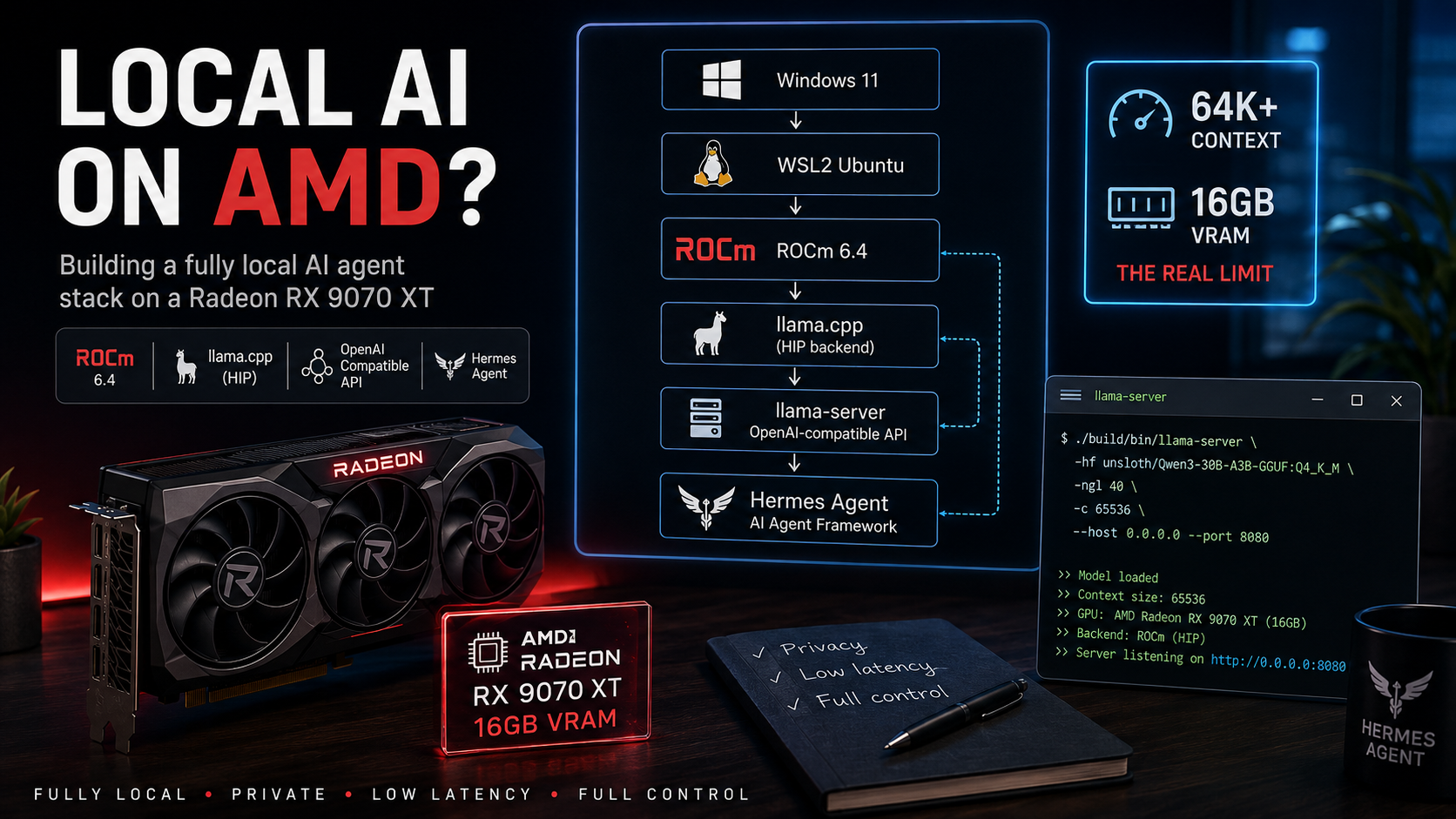
The goal of this project was to build a fully local AI agent stack using:
- Hermes Agent as the agent framework
- llama.cpp as the inference engine
- an OpenAI-compatible local API
- AMD ROCm for GPU acceleration
- an AMD Radeon RX 9070 XT with 16GB VRAM
- Windows 11 and WSL2
The main challenge wasn't simply getting an LLM to generate text.
Modern agent workloads need more:
- large context windows
- enough memory for conversation history
- tool calling
- reliable long-running sessions
- a sufficiently capable model
I already knew that a Qwen 27B-class model could perform very well on an NVIDIA RTX 4090 with its 24GB of VRAM.
But what happens when we try to build a similar agent stack around an AMD Radeon with only 16GB?
That became the experiment:
How far can we get with an AMD Radeon RX 9070 XT?
Hardware
The test system:
- AMD Ryzen 7 5800X3D
- 64GB system RAM
- AMD Radeon RX 9070 XT
- 16GB VRAM
- Windows 11
The RX 9070 XT is an interesting card for local AI.
16GB is considerably better than the 8GB or 12GB found on many consumer GPUs, but it's also right at the point where larger LLMs become difficult.
And there's another complication:
I wanted to run AMD GPU acceleration inside WSL2 on a Windows host.
Unlike NVIDIA CUDA, AMD ROCm support under Windows and WSL has historically required a bit more experimentation.
Software Architecture
The final architecture looks like this:
Windows 11
└── WSL2 Ubuntu
    ├── ROCm 6.4
    ├── llama.cpp (HIP backend)
    ├── llama-server
    │   └── OpenAI-compatible API
    │
    └── Hermes Agent
The idea is simple.
llama.cpp runs the model and exposes an OpenAI-compatible API.
Hermes Agent then talks to that endpoint just like it would talk to another OpenAI-compatible inference provider.
That separation is useful because Hermes doesn't really need to know that there's an AMD GPU underneath it.
Installing WSL2
First, install WSL:
wsl --install
I installed Ubuntu and then updated the environment:
sudo apt update
sudo apt upgrade
For building llama.cpp, we also need the usual development tools:
sudo apt install git build-essential cmake
Installing ROCm inside WSL2
After installing ROCm, the first thing to check is whether the HIP compiler is available:
which hipcc
Expected output:
/usr/bin/hipcc
Then check the version:
hipcc --version
In my setup:
HIP version: 6.4
So far, so good.
But checking the GPU produces one of the first confusing things about ROCm under WSL.
rocm-smi Doesn't Work
Normally, on a Linux ROCm machine, you might try:
rocm-smi
Inside WSL2 I got:
ERROR: Driver not initialized
(amdgpu not found in modules)
At first this looks like ROCm isn't working.
But that's not necessarily the case.
WSL2 doesn't expose the AMD GPU in exactly the same way as a normal native Linux installation, so rocm-smi isn't the right test here.
The much more important command is:
rocminfo
And there the GPU appeared:
Agent 2

Name: gfx1201
Marketing Name: AMD Radeon RX 9070 XT
Excellent.
ROCm could see the GPU.
Building llama.cpp with ROCm
Next came llama.cpp.
My first build was simply the standard build:
git clone https://github.com/ggerganov/llama.cpp
cd llama.cpp

cmake -B build
cmake --build build
Then:
./build/bin/llama-cli --list-devices
The result wasn't particularly exciting:
Available devices:
No Radeon.
The reason is simple: this was just a normal build without the HIP backend enabled.
So I rebuilt llama.cpp with HIP support:
cmake -B build \
  -DGGML_HIP=ON \
  -DCMAKE_BUILD_TYPE=Release

cmake --build build -j$(nproc)
Now:
./build/bin/llama-cli --list-devices
returned the important bit:
Available devices:

ROCm0:
AMD Radeon RX 9070 XT
(16253 MiB)
Success.
llama.cpp was now actually using the Radeon through ROCm inside WSL2.
That's already an important milestone because the rest of the stack doesn't require anything AMD-specific.
Starting llama-server
llama.cpp includes llama-server, which exposes models through an HTTP API that's compatible with the OpenAI API format.
For an initial test I used Qwen3 14B:
./build/bin/llama-server \
  -hf OMP123/Qwen3-14B-Q8_0-GGUF:Q8_0 \
  -ngl 999
  --host 0.0.0.0 \
  --port 8080
A quick note about -ngl:
This controls how many model layers llama.cpp tries to offload to the GPU.
For example:
-ngl 20
offloads 20 layers.
Using something like:
-ngl 999
effectively tells llama.cpp to offload as much of the model as possible.
Once the server was running, the API became available at:
http://localhost:8080/v1
A simple test:
curl http://localhost:8080/v1/models
returned the loaded model.
At this point we had:
RX 9070 XT
    ↓
ROCm / HIP
    ↓
llama.cpp
    ↓
llama-server
    ↓
OpenAI-compatible API
Now came the interesting part.
Could Hermes Agent actually use it?
Connecting Hermes Agent
Hermes Agent supports custom OpenAI-compatible endpoints.
I configured the endpoint as:
http://192.168.2.69:8080/v1
Hermes successfully connected:
Verified endpoint
1 model(s) visible
This meant the complete chain was working.
Hermes could talk to llama.cpp, llama.cpp was running inside WSL2, and inference was being accelerated by the RX 9070 XT.
But then I ran into the next limitation.
And this one was much harder to solve.
The Context Window Problem
Hermes Agent expects a reasonably large context window for agent workloads.
In my case the important requirement was:
minimum 64,000 tokens context
My initial llama.cpp configuration reported a considerably smaller runtime context:
n_ctx: 40960
Depending on the configuration, it could be even lower.
The important distinction here is that this does not necessarily mean the model itself is architecturally limited to 40,960 tokens.
It means that's the context available to the running llama.cpp instance.
And increasing it isn't free.
For example:
-c 65536
requests a 65,536-token context.
But a larger context requires a larger KV cache.
And the KV cache needs memory.
So suddenly we're balancing several things:
Model weights
    +
KV cache
    +
GPU compute buffers
    +
llama.cpp overhead
    =
VRAM usage
With 24GB or 32GB GPUs there is considerably more room to play.
With 16GB VRAM, every gigabyte matters.
Why Context Matters So Much for Agents
For simple chatbot usage, a smaller context window might be perfectly acceptable.
Agents are different.
An agent may need to keep:
- the system prompt
- tool definitions
- conversation history
- tool results
- retrieved documents
- intermediate reasoning state
- previous actions
inside its context.
That can become surprisingly large.
So a model that runs beautifully with a 16k or 32k context isn't automatically a good model for an autonomous agent.
For my Hermes setup, I wanted at least:
64k context
That significantly changed which models were practical on the 9070 XT.
Testing Qwen3-30B-A3B
The next experiment was much more ambitious:
Qwen3-30B-A3B
This is particularly interesting because it's a Mixture-of-Experts model.
Roughly speaking:
Total parameters:            ~30B
Active parameters per token: ~3B
That sounds fantastic for local inference.
Only a fraction of the parameters are active for each token, reducing the amount of computation required compared with a traditional dense 30B model.
But there's an important catch.
3B active parameters does not mean the model has the memory footprint of a 3B model.
The model weights still have to be stored somewhere.
MoE architectures can dramatically reduce the compute required per token, but they don't magically make the remaining model weights disappear.
I tried:
./build/bin/llama-server \
  -hf unsloth/Qwen3-30B-A3B-GGUF:Q4_K_M \
  -ngl 999 \
  -c 65536 \
  --jinja
Full GPU offload didn't fit.
The required VRAM exceeded the approximately 16GB available on the RX 9070 XT.
This was exactly the problem I expected to eventually hit:
large model
    +
64k context
    +
16GB VRAM
    =
not enough space
Partial GPU Offloading
Fortunately, llama.cpp doesn't require the entire model to fit into VRAM.
We can reduce the number of GPU-offloaded layers.
For example:
-ngl 40
This keeps part of the workload on the GPU while allowing the remaining model data to reside in system memory.
That's one of llama.cpp's biggest strengths for local inference.
Instead of:
Model doesn't fit → impossible
we get:
Model doesn't fit → offload what we can
The downside is performance.
Once CPU and system RAM become heavily involved, inference becomes slower than full GPU offload.
But it also means models that would otherwise be completely impossible on a 16GB card can still run.
Exploring Efficient 27B Models
That led to another experiment:
Ternary Bonsai 27B
The attraction of models like this is obvious.
The goal isn't necessarily to find the largest model we can technically start.
The real goal is to find the best combination of:
- reasoning quality
- tool calling
- context size
- VRAM usage
- inference speed
- stability
for an actual agent.
That's a very different optimization problem from simply asking:
What's the largest LLM my GPU can load?
A 30B model that technically runs but becomes painfully slow isn't necessarily better than a smaller model that runs entirely on the GPU.
Likewise, a brilliant model with only enough memory left for a small context isn't ideal for Hermes.
16GB VRAM Is the Real Constraint
This experiment made one thing very clear:
16GB is both a lot of VRAM and not very much VRAM at all.
For normal gaming, it's generous.
For local AI, it puts you in an interesting middle ground.
You can comfortably run many capable models.
But once you start combining:
20B+ model
    +
high-quality quantization
    +
64k / 128k context
    +
agent workloads
memory becomes the limiting factor very quickly.
And that's before trying to serve multiple concurrent users.
What Actually Works
The important result of this experiment is that the underlying AMD stack works.
My setup:
| Hardware | |
|---|---|
| CPU | AMD Ryzen 7 5800X3D |
| System RAM | 64GB |
| GPU | AMD Radeon RX 9070 XT |
| VRAM | 16GB |
| Software | |
|---|---|
| Host OS | Windows 11 |
| Linux environment | WSL2 Ubuntu |
| GPU stack | ROCm 6.4 |
| Inference | llama.cpp HIP backend |
| API server | llama-server |
| Agent | Hermes Agent |
Working:
- ✅ AMD GPU acceleration inside WSL2
- ✅ ROCm / HIP
- ✅
llama.cppGPU inference - ✅ Radeon RX 9070 XT detected correctly
- ✅ OpenAI-compatible
llama-serverAPI - ✅ Hermes Agent can connect to the local endpoint
- ✅ Larger models can use partial GPU offloading
The remaining challenge isn't getting the stack to work anymore.
The stack works.
The challenge is finding the sweet spot between model capability and memory consumption.
What I Learned
The biggest surprise wasn't that AMD could run llama.cpp.
It was how usable the entire stack has become.
We're running:
Windows
   ↓
WSL2
   ↓
ROCm
   ↓
HIP
   ↓
llama.cpp
   ↓
OpenAI-compatible API
   ↓
Hermes Agent
on a consumer Radeon GPU.
That's pretty cool.
But the experiment also demonstrated why VRAM remains the defining resource for local AI.
Raw inference speed isn't enough.
For an agent, we also need enough memory for the model and its context.
A 16GB GPU forces compromises.
You can choose:
- a smaller model with a large context
- a larger model with partial CPU offload
- stronger quantization
- a smaller context
- or some combination of all four
Finding the right balance matters more than simply chasing parameter counts.
Conclusion
So, can you run a serious local AI agent on a 16GB AMD Radeon?
Yes.
ROCm works inside WSL2.
llama.cpp works.
GPU acceleration works.
The OpenAI-compatible API works.
And Hermes Agent can use it.
The difficult part isn't making the software stack function anymore.
It's fitting enough intelligence and enough context into 16GB of VRAM while keeping inference fast enough to be enjoyable.
That's where efficient models, better quantization, MoE architectures, KV-cache optimizations, and newer inference techniques become really interesting.
A 24GB or 32GB GPU obviously gives you considerably more freedom.
But this experiment shows that 16GB is already enough to build a genuinely useful AMD-powered local AI stack.
You just have to choose the model carefully.
And that's where the next experiment begins.