
Can Two Old Tesla V100s Beat an RTX 4090 for a Fully Local Hermes Agent?
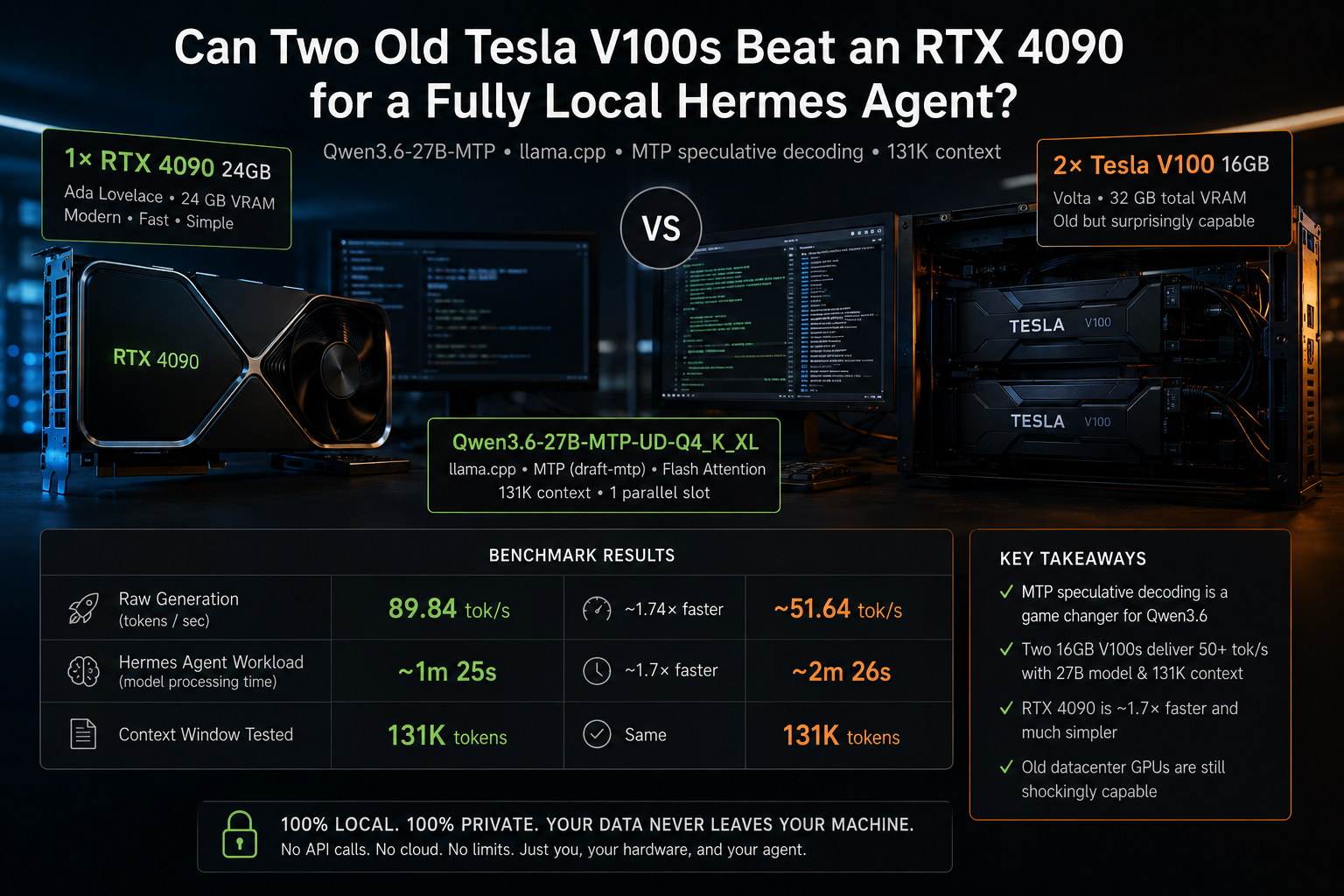
Testing Qwen3.6-27B, llama.cpp, MTP speculative decoding, 131K context, and whether cheap server GPUs are actually worth it for local AI agents.
I’ve been experimenting with local AI agents for a while now.
I previously wrote a few articles around OpenClaw and running AI locally, but the results were, frankly, rather sobering.
The fundamental problem was simple:
16 GB of VRAM just isn’t enough if you want to run a capable local agent comfortably.
You can absolutely run LLMs on a 16 GB GPU. You can quantize models aggressively, offload parts to system RAM, reduce context size, and experiment with smaller or specialized models.
I tried that.
I even experimented with a specialized Bonsai 27B model on my own 16 GB AMD GPU.
It works.
But “the model runs” and “this is a local agent I actually want to use” are two very different things.
For an agent such as Hermes, context matters enormously. The system prompt, tools, skills, repository files, conversation history and tool results all consume context before the model has even really started doing useful work.
I wanted something closer to the experience of using a good cloud model — except completely local.
No prompts leaving my machine.
No API bill.
No third party processing my private data.
The only company getting paid while I'm using it should ideally be my electricity provider.
And that led me down a surprisingly interesting rabbit hole.
TL;DR
A single RTX 4090 is clearly the faster and easier option for running Hermes Agent locally. With Qwen3.6-27B-MTP, llama.cpp and a 131K context window, I measured around 90 tok/s on one RTX 4090 versus roughly 50–52 tok/s on two old Tesla V100 16 GB PCIe cards.
But the V100 result surprised me: 32 GB of combined VRAM, no NVLink, a modern 27B model, 131K context and still more than 50 tok/s is absolutely usable for a local AI agent.
The biggest lesson, however, wasn't really V100 vs. 4090. It was MTP speculative decoding. The correct Qwen3.6 MTP model together with a recent llama.cpp build makes a huge difference.
If you already own a 4090, use it. If you're building a dedicated AI homelab from used hardware, old high-VRAM datacenter GPUs are much more interesting than I expected.
The obvious GPU candidates
If 16 GB isn't enough, the next step is obviously more VRAM.
For a reasonably priced local AI machine, I saw three particularly interesting possibilities:
| GPU | VRAM | Why it's interesting |
|---|---|---|
| RTX 3090 | 24 GB | Relatively cheap used, CUDA, still fast |
| Radeon RX 7900 XTX | 24 GB | Lots of VRAM and strong raw hardware |
| 2× Tesla V100 16 GB | 32 GB total | Old datacenter hardware, potentially cheap |
And of course there is the obvious benchmark target:
RTX 4090 24 GB.
The 4090 is an absolute monster for local inference, but buying one specifically for a home AI agent is still difficult for me to justify.
Especially since I recently bought AMD's current flagship for my own desktop — and that's a separate rabbit hole deserving its own article.
So I wasn't particularly interested in buying another expensive gaming GPU just for Hermes.
Then I stumbled across an article/video from German computer magazine Heise about running Hermes Agent with Qwen3.6 completely locally.
That changed things.
The important part wasn't the GPU
Initially, their setup confused me.
They mentioned Ollama, so naturally I tried Qwen3.6 through Ollama.
And my first impression was:
This isn't particularly good.
It ran, but it wasn't the kind of performance that would make me build a dedicated local-agent machine.
Then, near the end (26:40), came the important detail.
They weren't ultimately getting those results with a plain Ollama configuration.
They were using llama.cpp with some very specific parameters.
And one parameter in particular turned out to be extremely important:
MTP.
Multi-Token Prediction.
That's where this experiment became much more interesting.
Qwen3.6 + MTP + llama.cpp
The model I eventually settled on was:
Qwen3.6-27B-MTP-UD-Q4_K_XL
served directly through llama.cpp.
Modern llama.cpp exposes MTP as a speculative decoding mode:
--spec-type draft-mtp
--spec-draft-n-max 3
Instead of generating strictly one token at a time in the traditional manner, the model contains MTP capabilities that llama.cpp can exploit to speculate several tokens ahead.
If those predictions are correct, multiple tokens can effectively be accepted together.
And with Qwen3.6, it works remarkably well.
This isn't a tiny benchmark optimization.
For this particular setup, MTP is the feature that makes the whole thing interesting.
First test: RTX 4090
I'm fortunate enough to have access to a machine at work containing RTX 4090s.
The server actually contains two RTX 4090s, but that wouldn't make for a particularly useful home-server comparison.
Nobody looking for a cheap local Hermes box is realistically going to conclude:
“I'll just buy two RTX 4090s.”
So for the actual comparison I deliberately restricted llama.cpp to one RTX 4090:
Environment="CUDA_VISIBLE_DEVICES=0"This gave us a much more useful reference:
1× RTX 4090 24 GB vs 2× Tesla V100 16 GB.
And critically, both could be tested with the same model and the same 131K context.
Why 131K context?
Hermes is an agent, not simply a chatbot.
That distinction becomes important very quickly.
On one of my tests, Hermes loaded a project AGENTS.md that alone was around 79 KB. Hermes even warned that it had to truncate the file when its configured limit was lower.
Then add:
- system instructions
- tool definitions
- available skills
- conversation history
- tool results
- files
- reasoning
- agent state
…and suddenly a “huge” context window doesn't look quite so huge anymore.
For these tests I therefore configured:
--ctx-size 131072
--parallel 1
That gives the single active slot the entire 131,072-token context.
This detail matters.
My original 4090 server configuration was:
--ctx-size 524288
--parallel 4
That does not mean each Hermes session gets a 512K context.
With four parallel slots, that's effectively:
524,288 / 4 = 131,072 tokens per slot.
For the benchmark, I changed it to one slot and 131K total context.
Same effective per-session context, much cleaner comparison.
But I'm not buying a V100 just to test this
This was the next problem.
Old Tesla V100s have become surprisingly interesting in the used market.
I first heard about the Nvidia V100 years ago, but eventually it completely disappeared from my radar. Then this excellent YouTube video brought it back to my attention.
But pricing depends heavily on the version.
At the time of writing, I was seeing roughly:
Tesla V100 PCIe 16 GB: ~€260
and:
Tesla V100 PCIe 32 GB: ~€560
There are also very cheap SXM2 V100 16 GB modules floating around, sometimes around the €100 mark.
Those YouTube videos are tempting.
But there's a catch.
SXM2 isn't PCI Express.
To use those modules in a conventional PC, you need adapter hardware, cooling, power delivery and potentially quite a bit of tinkering.
Once you calculate the entire setup, two €100 GPUs don't necessarily result in a €200 AI machine.
So should I buy two V100s just to find out whether this works?
Of course not.
I rented them.
Cloud GPUs are fantastic for hardware experiments
There are now several providers where you can rent GPU machines by the hour, including platforms such as Vast.ai and Verda.
Instead of spending hundreds of euros on questionable used datacenter hardware and then discovering that the idea doesn't work, I could simply rent the configuration I wanted.
My test machine had:
2× Tesla V100 PCIe 16 GB
for 32 GB total VRAM.
The entire experiment cost me roughly $6 in cloud time.
That's one of my favorite lessons from this project:
Before buying weird old AI hardware from eBay, rent approximately the same hardware for a few dollars and benchmark it yourself.
Are these SXM2 V100s with NVLink?
No.
nvidia-smi told us exactly what they were:
Tesla V100-PCIE-16GBAnd the topology confirmed that there was no NVLink connection:
        GPU0    GPU1
GPU0     X      NODE
GPU1    NODE     X
If NVLink were being used, nvidia-smi topo -m would show an NV# link between the GPUs.
So these are actually a useful worst-case-ish comparison for someone considering ordinary PCIe V100s.
The two GPUs communicate through the PCIe/host topology.
For autoregressive llama.cpp inference this didn't turn out to be the disaster you might expect.
Installing llama.cpp on the V100 machine
The rented instance already had the NVIDIA driver and CUDA environment available, which made setup pleasantly straightforward.
In simplified form, the important part was getting a recent llama.cpp build with CUDA support.
For example:
git clone https://github.com/ggml-org/llama.cpp
cd llama.cpp

cmake -B build \
  -DGGML_CUDA=ON \
  -DCMAKE_BUILD_TYPE=Release

cmake --build build --config Release -j$(nproc)
The important lesson here is:
Use a recent llama.cpp.
MTP support is evolving quickly, and the options we need are visible directly in current builds:
./build/bin/llama-server --help | grep -i -A8 "spec-type"Our build offered:
--spec-type none,draft-simple,draft-eagle3,draft-mtp,draft-dflash,
            draft-dspark,ngram-simple,ngram-map-k,
            ngram-map-k4v,ngram-mod,ngram-cache
Perfect.
Be careful which GGUF you download
I managed to lose some time here.
There are Qwen3.6 GGUFs with extremely similar filenames.
For this experiment we specifically wanted the MTP model repository/version.
Our final model was:
Qwen3.6-27B-MTP-UD-Q4_K_XL.ggufThis matters because simply taking a normal Qwen3.6 GGUF and adding:
--spec-type draft-mtpdoesn't magically turn it into the appropriate MTP model.
Ask me how I know.
One of my failed starts looked like this:
[spec] failed to measure MTP context memory:
failed to create llama_context from model
Once the correct model was in place, that problem disappeared.
Running Qwen3.6 across two V100s
Our V100 llama.cpp server eventually looked approximately like this:
./build/bin/llama-server \
  -m /opt/llama.cpp/Qwen3.6-27B-MTP-UD-Q4_K_XL.gguf \
  --device CUDA0,CUDA1 \
  -ngl all \
  --split-mode layer \
  --tensor-split 1,1 \
  -c 131072 \
  -np 1 \
  -fa on \
  --jinja \
  --spec-type draft-mtp \
  --spec-draft-n-max 3 \
  --host 0.0.0.0 \
  --port 8080
That gives us:
- two V100s
- even layer distribution
- full GPU offload
- Flash Attention
- 131K context
- one parallel slot
- MTP speculative decoding
And yes:
Qwen3.6-27B ran.
Very comfortably, in fact.
The RTX 4090 configuration
For the single 4090 we used essentially the same model and inference configuration:
llama-server \
  -m Qwen3.6-27B-MTP-UD-Q4_K_XL.gguf \
  --alias qwen3.6-27b-mtp-xl \
  --host 0.0.0.0 \
  --port 8080 \
  --n-gpu-layers 99 \
  --flash-attn on \
  --ctx-size 131072 \
  --parallel 1 \
  --cache-type-k q4_0 \
  --cache-type-v q4_0 \
  --spec-type draft-mtp \
  --spec-draft-n-max 3 \
  --jinja
And CUDA_VISIBLE_DEVICES=0 ensured llama.cpp only had access to a single RTX 4090.
Now we could finally compare them.
Benchmark 1: raw generation
I deliberately kept the first benchmark stupidly simple.
Same API request, same model family, same context configuration:
curl http://127.0.0.1:8080/v1/chat/completions \
  -H "Content-Type: application/json" \
  -d '{
    "model": "qwen3.6-27b",
    "messages": [
      {
        "role": "user",
        "content": "Explain quantum computing in 100 words."
      }
    ],
    "temperature": 0.7,
    "max_tokens": 200,
    "stream": false
  }'
The results were already interesting.
| Configuration | Generation |
|---|---|
| 1× RTX 4090 24 GB | 89.84 tok/s |
| 2× Tesla V100 16 GB | ~50–52 tok/s |
The best V100 result we measured was approximately:
51.64 tokens/sec.
That makes the RTX 4090 roughly:
1.74× faster.
Nobody should be surprised that Ada Lovelace beats two GPUs based on Volta.
What surprised me was how usable the V100 setup remained.
50+ tokens/sec for a 27B local agent is fast.
That's comfortably interactive.
MTP changes everything
Here's where things get particularly interesting.
On the RTX 4090 run, llama.cpp reported:
draft_n            = 189
draft_n_accepted   = 135
That's an acceptance rate of approximately:
71.4%.
The resulting generation speed was:
89.84 tokens/secMTP appears to be a major part of why this setup performs so well.
We also experimented with the number of speculative draft tokens on the V100 pair:
| V100 configuration | Generation |
|---|---|
| MTP draft max 3 | ~50.43 tok/s |
| MTP draft max 5 | ~51.64 tok/s |
| MTP draft max 7 | ~37.92 tok/s |
And this is a great reminder that:
More speculation isn't automatically better.
Increasing the draft length from three to five helped slightly.
Increasing it to seven made things substantially worse.
There's overhead to generating speculative tokens that ultimately get rejected.
For this hardware/model combination, the sweet spot was around 3–5 draft tokens.
But synthetic benchmarks aren't enough
Tokens per second are useful.
But I'm not building a token generator.
I'm building an agent.
So I wanted a workload that forced Hermes to actually do something.
Both machines received the same task:
Inspect the current Hermes Agent repository, identify the three largest Python files, briefly explain what each one does, and report their file sizes and line counts. Do not modify any files.
This is a much more interesting test.
Hermes had to:
- inspect the repository
- search for Python files
- execute tools
- calculate sizes
- inspect source files
- reason about their purpose
- assemble the final result
The agent correctly identified:
gateway/run.py
28,226 lines
1,368,848 bytes

cli.py
18,915 lines
878,182 bytes

hermes_cli/web_server.py
18,110 lines
721,811 bytes
The captured Hermes run shows the agent first locating and ranking the files, then reading them to determine their purpose. It ultimately described gateway/run.py as the messaging-platform gateway, cli.py as the interactive terminal interface, and web_server.py as the FastAPI backend for the web UI.
So this isn't just a benchmark where we ask the model to generate lorem ipsum as quickly as possible.
It's a real agent workflow.
Benchmark 2: actual Hermes Agent workload
This produced a remarkably similar result to our synthetic benchmark.
The faster run finished with Hermes showing approximately:
37.9K / 131.1K context
2m total
1m 25s model time
1s tool time
The captured run confirms the 37.9K/131.1K context usage and roughly 1m25s model-processing time.
The other system took approximately:
24.9K / 131.1K context
6m total
2m 26s model time
That gives us roughly:
| Test | RTX 4090 | 2× V100 |
|---|---|---|
| Raw generation | 89.84 tok/s | ~51.64 tok/s |
| Hermes model time | ~1m 25s | ~2m 26s |
| Raw generation advantage | ~1.74× faster | Baseline |
That's remarkably consistent.
The raw benchmark says the RTX 4090 is approximately 1.74× faster.
The real Hermes workload shows roughly the same order of difference in model-processing time.
There is an important caveat, however.
The Hermes runs didn't consume exactly the same amount of context — one ended around 37.9K while the other was around 24.9K.
So I would not present this as a laboratory-grade benchmark.
It's a real-world agent test.
And frankly, that's what I'm interested in.
The most surprising result: one 4090 is enough
Before doing this experiment, I assumed that a serious local agent with a capable ~27B model and a six-digit context window would inevitably turn into a multi-GPU science project.
It doesn't.
A single RTX 4090 with 24 GB can run Qwen3.6-27B with:
131K context + MTP + Hermes Agent
at around:
90 tokens/sec.
That's excellent.
For somebody who already owns a 4090, my recommendation is extremely easy:
Use the 4090.
Don't buy V100s.
Don't build an exotic multi-GPU machine.
Don't mess around with SXM adapters.
Just install a recent llama.cpp, use the correct MTP model, and enjoy it.
So why would anyone buy V100s?
Because the V100 result is much better than I expected.
Two 16 GB V100s give you:
32 GB aggregate VRAM.
And our PCIe cards — without NVLink — still managed around:
50 tokens/sec.
For an interactive agent, that's completely usable.
The question therefore isn't:
Are two V100s faster than an RTX 4090?
They're not.
The interesting question is:
How cheaply can I get enough VRAM for a genuinely capable local AI agent?
That's where old datacenter GPUs become interesting.
PCIe V100 vs cheap SXM2 V100
There's an important distinction here because a lot of recent YouTube content focuses on V100 16 GB SXM2 modules.
The headline price can look ridiculous:
around €100 for a 16 GB V100.
But an SXM2 module isn't something you simply insert into a normal PCIe slot.
You need an adapter/carrier solution, appropriate power delivery and serious cooling.
And you need it twice if your plan is 32 GB.
That changes the economics considerably.
Meanwhile, used native PCIe cards I found were roughly:
~€260 for V100 PCIe 16 GB
and:
~€560 for V100 PCIe 32 GB.
At that point you need to compare the complete system cost rather than the GPU listing price.
Two PCIe V100 16 GB cards alone are already around €520.
A sufficiently capable motherboard, PSU, case and cooling solution aren't free either.
What about a used RTX 3090?
This may actually be the most interesting unanswered question.
The RTX 3090 provides:
24 GB VRAM
and can often be found used for considerably less than a 4090.
It supports modern CUDA software well, requires no weird server-GPU adapters and fits into a conventional workstation.
If its Qwen3.6 MTP performance lands somewhere reasonably close to the 4090, a used 3090 could potentially be the sweet spot for a dedicated Hermes machine.
That's a benchmark for another day.
And what about AMD?
That is a story for another article.
I already have a modern AMD GPU with 16 GB of VRAM, and I've spent plenty of time experimenting with ROCm, WSL2, llama.cpp, and unusual models such as Ternary Bonsai.
And yes: it works.
Some of it even works surprisingly well. Getting ROCm, llama.cpp, and a local agent stack running on AMD is much better than it used to be.
But working and being genuinely useful as a local AI agent are two very different things.
For the kind of workload I'm interested in here — Hermes Agent, large context windows, capable 27B-class models, tool use, and decent generation speed — my AMD setup simply isn't in the same league as the RTX 4090 or the dual V100 setup.
And once again, the biggest limitation is painfully familiar:
16 GB of VRAM.
I've tried pretty hard to work around it, including aggressive quantization and models specifically designed to squeeze more capability into limited VRAM. There are some fascinating results, but also plenty of compromises.
AMD therefore deserves its own article — with its own setup guide, ROCm/WSL2 adventures, models, benchmarks, failures, and hopefully a few surprises.
Mixing all of that into this comparison would only distract from the question we're trying to answer here:
Can two old Tesla V100s be a viable alternative to a modern RTX 4090 for running Hermes Agent locally?
That is the question we'll stick to for now.
Installing Hermes Agent
One other thing worth clarifying: you don't need Hermes Desktop for this.
For a command-line-only Linux installation, Hermes provides an installation script:
curl -fsSL https://hermes-agent.nousresearch.com/install.sh | bashOnce Hermes is pointed at the OpenAI-compatible llama.cpp endpoint, the local llama.cpp server effectively becomes its model backend.
That's one of the nicest parts of this setup.
Hermes itself doesn't particularly care whether the intelligence behind that API endpoint is coming from an expensive cloud service or two ancient datacenter GPUs sitting under your desk.
Privacy is the killer feature
Performance is fun to benchmark.
But it isn't actually the primary reason I'm interested in this.
A capable local agent has access to much more sensitive information than a simple chatbot.
Potentially:
- source code
- shell access
- documents
- credentials
- local files
- browser sessions
- emails
- smart-home systems
- internal services
The more useful an agent becomes, the more uncomfortable I become with sending its entire working context somewhere else.
With this setup, inference happens locally.
The model weights are local.
The context is local.
Your prompts are local.
And your token counter isn't attached to a credit card.
There is something deeply satisfying about watching an agent chew through tens of thousands of tokens knowing that the only meter spinning faster is the electricity meter.
What did I learn?
The biggest lesson from this experiment wasn't that a 4090 is fast.
We knew that.
It wasn't even that two V100s can run a modern 27B model.
The interesting discovery was how much software configuration changes the usefulness of the exact same hardware.
Running a model isn't enough.
The combination that really worked was:
Qwen3.6-27B + correct MTP GGUF + llama.cpp + Flash Attention + speculative MTP decoding + enough context.
Take MTP out of that equation and the experience changes substantially.
Use the wrong GGUF and MTP may not work at all.
Set the context incorrectly with multiple parallel slots and you may think you have far more usable context than each agent actually receives.
Push speculative decoding too far and performance can actually decrease.
This is why comparing GPUs using a random Ollama command tells only part of the story.
The verdict
So, would I buy two Tesla V100s instead of an RTX 4090?
It depends on what I already own.
If I already had a 4090:
Absolutely not.
One RTX 4090 is dramatically simpler and approximately 1.7× faster in our tests while still delivering the 131K context I wanted.
If I were building a dedicated local AI machine from cheap used hardware?
Now the V100 becomes much more interesting.
2× V100 16 GB:
- 32 GB aggregate VRAM
- ~50 tok/s with Qwen3.6-27B MTP
- 131K context tested
- Hermes Agent works
- old hardware
- relatively cheap
- higher power consumption
- multi-GPU complexity
1× RTX 4090 24 GB:
- 24 GB VRAM
- ~90 tok/s
- 131K context tested
- much simpler
- much newer architecture
- excellent MTP performance
- substantially more expensive
And that's why I don't think the conclusion is:
“Buy a V100.”
The conclusion is:
Don't dismiss old high-VRAM datacenter GPUs for local AI agents.
Two PCIe V100s from 2017-era Volta hardware running a current 27B model at more than 50 tokens per second with a 131K context window is frankly impressive.
And if the ultra-cheap SXM2 route can reproduce similar results without turning the rest of the machine into an expensive adapter-and-cooling project?
That deserves another experiment.
A note about how this article was made
In the spirit of the subject itself, AI was used extensively throughout this experiment.
I used AI to help research the setup, troubleshoot llama.cpp and CUDA configuration, interpret logs, construct benchmark commands, configure Hermes Agent, compare results, and draft and edit this article.
The hardware was real, the commands were actually executed, and the benchmark results shown here came from those runs — but AI was very much a tool throughout the entire process.
It seems slightly absurd to write an article about AI agents without using an AI agent to help write it.
So I didn't.